Showing posts with label Computers and Internet. Show all posts

Sunday, October 20, 2013

Samsung N-7000 Repair

When the original Samsung Galaxy Note N-7000 was released in 2011, I acquired one from someone locally who had paid to have it shipped from India.  This is not a problem if you do not have any issues with the device requiring warranty repair since obtaining it requires that the device be shipped back to that region for repair.  This issue reared its head about 6 months in to owning it when the device began to act funny:  it would act like I was plugging in and unplugging a MicroUSB cable.  It would make the same noise and change the battery icon on the status bar to one indicating that the device was charging,.

An exhaustive search of the Internet and the XDA-Developers Forum for the N-7000 indicated that it was related to a bad component on the USB Charging board.  Since the problem seemed to rectify itself, I put it out of my mind until it started doing it again.  It seemed to do it regularly when the temperature got warmer but would rectify itself eventually so I just ignored it.  Then when school started, it began doing it again but this time, it would not let me turn on the phone unless it was plugged in to power and it did not go away.  So I searched YouTube and found a video showing how to replace the defective board:

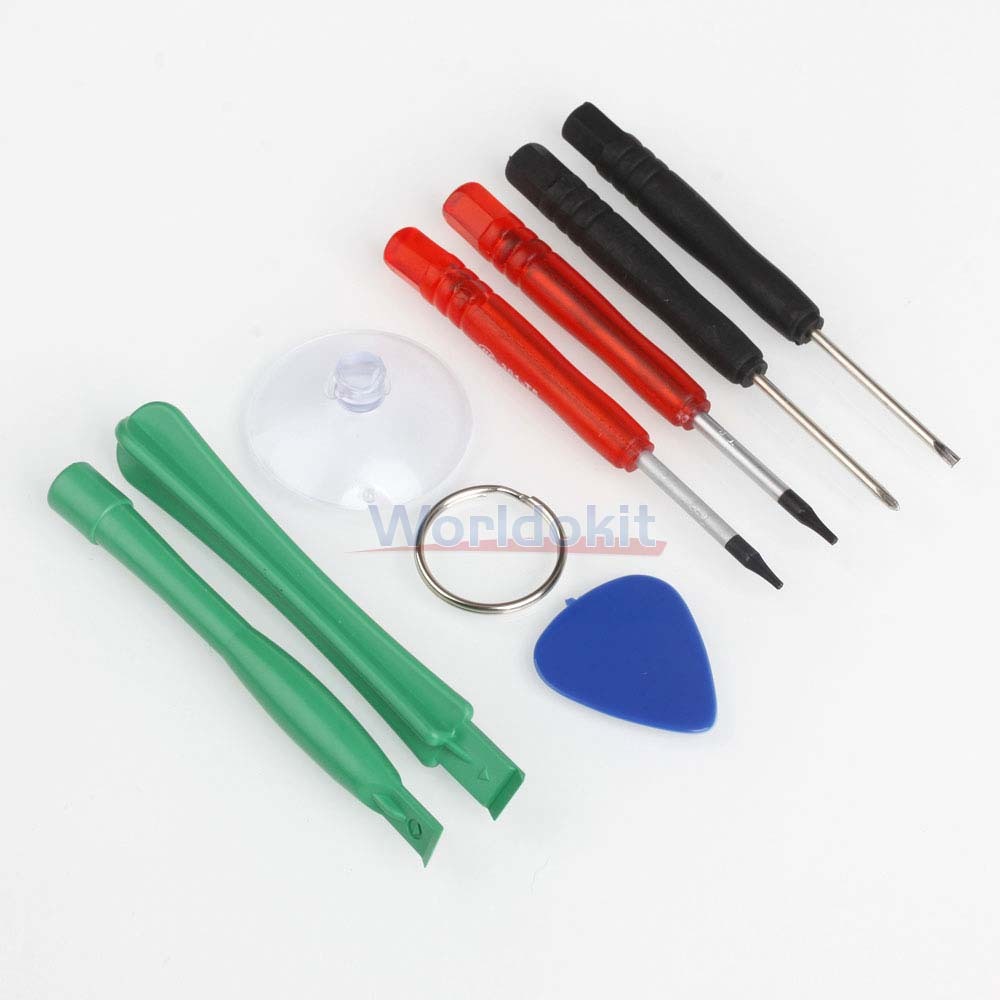
The video made it look truly easy with the tools used.  So I then began searching E-Bay and found the perfect set of tools shipped on the slow boat from China for $2.99.

So I then ordered the tools, because at this price they would come in handy for a multitude of tasks.  I then searched for and found the board for $5.09 plus $.99 shipping on the same slow boat from China.  So, I of course, ordered this as well.

The screwdrivers arrived last week and the board arrived this week.  I had been nervous about doing it, afraid that I would somehow frack it worse then it already was and I was not planning on doing it today anyway.  Except that I sat down and I thought about what I had learned in the management class, about not being afraid of failing.  So I prepared myself to accept my failures and put them right up alongside of my successes and achievements.

I am glad that I did take the time to do this, since I now have a completely functional device and the total repair time took less then 10 minutes in total and was just as easy, if not easier then the video showed.  The only issue was that I dropped a screw on the floor, but found it almost immediately.  I then thought I had lost a screw and just when I had given up and decided to accept its loss, I found it.  So all in all an easy repair.  This is the power of User Forums and your fellow device enthusiasts on the internet, because chances are, someone, somewhere has had the same issue as you and they figured out how to fix it or work around it.

Monday, October 15, 2012

New Facebook Attack

So, I was looking at my stream on Facebook and came across a post by someone I trust that looked like this:

image

The subject matter and the title by my friend was a clue, so I clicked the link.  The page that appears is this:

image

If you look closely, the Submit button is drawn over the original Facebook button that allows you to use your Facebook credentials to login to a website.  By clicking submit, the same link above will be posted to your wall and the ‘Hacker’ will have access to your Facebook account.  Every one of your friends who clicks and does the same thing will perpetuate this scenario.  Pass this around so that we can stop this from spreading.

If this happened to you, change your password and look in your Facebook security settings and remove any unknown apps and websites that have access to your account.

Wednesday, October 10, 2012

FBI Virus

So, there is a new creative Malware circulating throughout the US and world.  It is called the FBI Virus and when it infects your computer it displays the following screen:


IMAG0462a


This screen prevents you from doing anything with your PC except entering payment information.  Since this is NOT a real message from the FBI or any law enforcement agency and there is a simple fix.  Download ComboFix, Install it.  Reboot the PC in to safe mode and run Combo Fix.  Allow it to scan and clean everything it finds.  Then update your antivirus and other malware software and allow them to perform a full system scan.  This is the easiest and most direct way of getting rid of this Nag Screen, which will not go away or allow you to do anything else until you do.  Also, there is no guarantee that paying the fee will get rid of the issue and that it wont just keep popping up randomly and demand money.

Wednesday, September 19, 2012

Keeping Your Data Secure

Now, I do not do much with my phone that I am worried about.  I also am not paranoid about people invading my home to find what nefarious acts that I am doing on my computer or my phone.  That being said, I do not want someone to access the information on my phone without permission.  I have always had a pin code or now a pattern lock on my phone.  The new Atrix that I purchased for my wife so that we can switch from Sprint has a Fingerprint Reader and I have encouraged her to use it.  What does kind of make me nervous is the fact that the court has ruled that Police can take your cell phone during a routine traffic stop and look through it without a warrant.  Sure, right now it is only in Florida but the way our legal system works, it could easily be used as the basis for a ruling in other states.   This is even scarier when you add to it that Michigan Police have a device that can copy all of the information on your phone, including deleted information in less then a minute.  Why does this scare me?  Let’s say for instance, your child is in the bubble bath and just gave themselves a soapy Mohawk and are not showing anything but the minute before you snap the picture they stand up exposing themselves to you and the camera.  You delete the photo and think it is gone forever and they find it, technically in the eyes of the law it is child pornography.  The police will charge you with possession of child pornography and more then likely it will make it in to the news papers because it is sensational.  Even if you are later found innocent of the charges, that court decision will not receive the publicity or the front page status like your arrest and the damage will be done.  Not to mention those risqué pictures you took of the two girls in your ultimate fantasy threesome.

The other reason you should worry about this is if you use those free charging stations in airports, ever because they can do pretty much the same thing as that device mentioned above or worse because there are ways to potentially put information on your device without your knowledge like viruses and hidden applications.  People may say it is not possible, and I used to think it was impossible to infect a Windows PC just by connecting to the Internet and then someone figured out how to do it.   So just because it seems impossible does not mean that it really is or will always be so.  We used to think that our government didn’t kidnap random people from around the world, regardless of reason, take them to a not so secret, secret military base in Cuba to torture them with enhanced interrogation techniques.  Then we found out that they did it quite regularly and also wanted to be able to do it to citizens too.  But I digress.

So how do you prevent this from happening?  Android devices have the ability to disable the USB port for anything other then charging.  I am going to show you how to do it with the two most popular brands of Cell Phones, Samsung and HTC.  HTC is easy, this screenshot is from the HTC Sensation, go to Settings and USB and the screen looks like this:

1348118112694 (1)

So uncheck the Ask me option and set the Default connection to charge only.  You will have to change this each time you wish to copy things to or from the phone.  If you want you can check the Ask Me and the default to Charge Only, this will let you change it on the fly when you connect it to your computer.

Next you will want to go to the Security settings and enable a screen lock.  The most secure is a pin code, but the pattern lock is secure enough that the FBI asked Google for a back door, which they said was not possible, publically.  In that regard it does not matter which you use if there is a back door around it.  Once this is done, your device is pretty safe from the scanners listed above.  This screen shot is from my Samsung Galaxy Note:

Screenshot_2012-09-19-22-22-10

As you can see I have enabled the Pattern Lock and the pattern is visible.  As I said, I know that nothing will stop everyone so I am primarily concerned about deterring the less determined people.  I usually turn it off to be honest and have just left it on since I only use it as a tablet right now until I port my number from Sprint.  This should be very similar to the HTC or other Android devices in how this functions.  I know it works on my Sprint Samsung Galaxy S II Epic 4g Touch, and yes that is a mouth full.

Screenshot_2012-09-19-22-28-29

Right now it is configured to be connected to the PC, I am running Ice Cream Sandwich and if you notice in the top Status Bar, the USB icon on the left side.  If you pull down the ‘curtain’ it will say “Connected As Media Device” or something else if you have uncheck this.  If you then click on that it will bring up this page so that you can change it on the fly.  When the first option is unchecked, the USB port only functions as a charging port.

Finally, under Settings, Development make sure that USB Debugging is not checked.  Once this is done, your device is impervious to the device mentioned above.  There is always more you can do to secure your device and this is only the first  step.  I will add more in future articles.  Just because you have nothing to hide, doesn’t mean you shouldn’t or do not need to secure your device because in this day and age you never know what could be misinterpreted or used against you so securing your digital device is the smart thing to do.

Friday, August 3, 2012

Loss or Theft of a Smart Device


When I started using a Smart Phone they were not called such, they were referred to as a PDA Phone in the beginning and then Microsoft needed to refresh their mobile operating system and coined the term Smart Phone.  I wasn’t particularly worried about loss or theft because I pin protected the device and I had insurance from my carrier, Sprint, that would replace the device after a modest deductible.  I also did not worry about my data because I had everything synced with Outlook, even text messages and call history.  This worked well for me because when a device failed or was replaced all I had to do was plug it in the USB port and away I went.

When I got my Android tablet, I set it up so my important personal data was kept in a secure, encrypted container with a complex passcode.  So I was not worried about people accessing my data and my device was insured.  I never thought about theft because I always kept the device secure or on my person.  A couple of weeks ago, it was in my car, in my driveway and someone took it out of my car.  Needless to say I was devastated and posted on Facebook about it.  Within minutes one of my friends suggested a piece of software called Plan B  that I could install in the hopes that it would help me retrieve my missing device.  The awesome thing about Google Play is that you can login to the website and install applications on your device through the website.  So I chose to install Plan B and thus far it has not worked for me but this could mean the device has just not been connected to the internet or that someone wiped the device.  If it does connect to the internet it is supposed to email me the location when it does. 


Google PlayIf I had not of cancelled the wireless internet on the device, it would have installed instantly and notified me of the location.  I could then use text messages to control the device.  Unfortunately when Sprint screwed over all their HTC View owners I eventually decided that $20 a month for 1gb was just too much money.  Even if I did not get ahold of the device, I carried the $15 dollar insurance package which would have replaced the device by now for a small modest fee.  Unfortunately the insurance went along with the service.  I know, sucks to be me and I just hope that all the fleas from all the camels in Saudi Arabia infest the person who took it’s underwear so that it gives new meaning to Jock Itch.  While I know anyone could have done it, I am leaning more towards a male as this was a very bold theft.  But I digress.


For my Cell Phone I have installed a program from Google Play called Prey and this program will allow you to do some awesome things with your device remotely should it become misplaced or misappropriated.  I will let you know after I have had some time to play with it if it is a viable option or not.  There are quite a few applications like this on the market and I always try and use the open source products first since this allows others to fix the bugs or take over development should the current developers decide against further development or they get a real life. Smile


So I recommend installing something and making sure that if you have a high end smart device that you also carry theft and damage insurance from your carrier.  A new smart device can run as high as $800 without a carrier discount and they only give them every two years so if you lose the device it will cover it.  Most carriers have it for $10-15 and a $100 deductible which over the course of a two year contract with no deductibles will set you back about $300 but isn’t that worth it knowing that if you drop it or lose it that it will be replaced?

Tuesday, June 19, 2012

Securing Your Digital Life–Introduction

I decided to write this series to help a friend of mine better understand how to secure herself against creepy ex-boyfriends who knew everything about her.  Since I am a network security expert, she asked me my advice and I realized that I should probably write a blog about it and never did.  While none of this is female specific, it is something that single females should do to secure themselves and their lives in the modern age.  Ever since I got involved with computers, I have always been interested in security and this probably stemmed from running a BBS at 300 baud.  As computers progressed and I moved in to the corporate IT World the focus on Data availability, integrity and security all became a focal point.  Emphasis was put on ensuring that users stored all data and documents on the server so that it could be secured and backed up.  While I was focusing on security the consumer world was introduced to windows without any security at all.  Users relished the freedom and ridiculed the lack of security.

Most people are of the misguided belief that there is nothing of value on their computer and that they have nothing to worry about on their computers.  I am telling you to not be so sure about that and you really do not have to give up any freedom to make things a little more secure.  I am going to explain why you should adopt these practices and then how to implement them and get used to using them.  The idea is to keep you safe online and safe if someone steals your computer or smart phone.  I will use real language and terms and try and explain them in everyday terms so that you can understand what the goal is and exactly how it is accomplished.

Around 2004 I got to see the seedier side of computer based crime that dealt with identity theft and fake documents.  Someone who had been shown the basics by someone showed them to me.  Using Photoshop he showed me the template for the new California Drivers License that would take effect in January, this being December.  He then used the webcam on the notebook to take my picture and using Photoshop placed it in the correct places and onscreen it looked like it came from the DMV.  We used all of my real information and he showed me the process to make an ID. First he printed the main layer on white paper.  Then he printed another layer on clear transparency film and then another and finally the back layer.  Each layer was cut to the precise size and then a clear epoxy was used to glue the back to the back of the base layer.  Then each subsequent layer was glued on the top.  When everything was complete it looked just like the real ID minus the gold printing.  He then took this foil paper, placed it on the top and ironed it with an iron.  When he removed the foil even the gold printing was there.  The only thing that didn’t work was the magnetic strip.

This was an entry level setup and the IDs it made would pass all rudimentary inspection if the maker paid attention to all of the details and took their time to ensure each step was perfect.  I can only imagine what an artist with even more tools could accomplish in the same time.  That being said, this made me realize how easy identity theft really is and  that is the first area I will focus on.  Ironically the same methodology used for this can also help ensure that an overly possessive boyfriend cannot snoop on you as easily either.  A girl has to have her secrets.  I have also been asked multiple times by clients over the years for assistance in personal matters that involved computer security and forensics.   A friend contacted me today and explained the situation his friend was in, she was evidently somehow involved with someone or friends with someone who first tech-raped her and is now holding her tech-hostage.  What I mean by this is he helped her setup her iPhone to sync with her ISP email and in doing so, he gained access to her passwords.  He allegedly has hijacked her Facebook page and made inappropriate posts.  So in the middle of the first draft of this blog, I began discussing this with him and offering advice.

I set my cell phone as a cell phone and only point of contact with the people that I do business with.  I use a Patelco, a credit union, instead of a bank.  I keep the address on most of my financially related information at an address other then my home address.  This buffers and protects my identity because the only one with this other address are my creditors.  I try and opt for online billing as often as possible.  I download and save or print a PDF version of the bill and save it in a folder on my hard drive named yyyymmdd-accountname.pdf and then at the end of the year I zip all of the previous years up and leave the zip folder named yyyy–accountname.zip. I use this kind of archiving for everything.  I save my camera phone photos by year and separated by decade.  But I am lazy about backups, and continue to be so even though I have lost so much data to hardware failure.

Let’s get some things on the table:  I do not trust the cloud for many reasons the most important of which is that it is for profit and that means they will change the terms and conditions at anytime and you have to agree to them and the second is most of them indemnify themselves from liability regardless of their culpability.  They also often have weird clauses about who actually owns the information being stored on their cloud.  But that is another story and blog.

Most online services and websites require a password although now it seems like there are two major providers and two minor providers of cross site logins:  Twitter and Facebook followed by Microsoft and Google.  I have personal and professional accounts at AOL/AIM, ICQ, Microsoft, Google, Yahoo and have Facebook, My Space and Linked In.  All of these require passwords.  To add to that complexity, I have my main email address: sgoldfein@gmail.com as valid addresses for AIM, MSN, and Google.  Yahoo uses sgoldfein@yahoo.com and I also have an MSN for sgoldfein@hotmail.com.   These all require unique secure passwords and a way to remember them securely and that’s just the beginning.

There is this myth that there is a need to constantly change your password for security and integrity reasons although I am not sure where this ideology came from but Microsoft did a massive study over a several year period of time and realized that forced password changes on a random basis provided absolutely no more security then using the same password for the entire period of time.  They also found that the help desk spent far more time resetting passwords soon after the change then at any other time and that there were little to no password resets necessary when the users were not required to change their passwords.  So in conclusion: requiring random password changes doesn’t increase security but it does reduce productivity and increase help desk costs.

The one thing there is no myth about is choosing passwords and securing them after we choose them.  When I first started life online, I used one password or a derivative of it on every BBS I joined.  I quickly learned that this was a stupid move and an asshole sysop could find out your password and logon as you somewhere else.  About 10 years ago I found a program called Roboform and it revolutionized how I did passwords because it allowed me to carry my list of passwords with me on a Flash Drive or my Cell Phone encrypted from prying eyes.  Roboform has come a long way and there are versions available for Windows, Macintosh, Cloud Based, Android, and IPod/IPad.  Roboform integrates with most browsers, although right now it does not work with Maxthon like it is supposed to but that’s not a show stopper.

Download the installer from the website above and save it to the Downloads folder on your computer and then navigate to that folder using My Computer or Windows Explorer.  Select and double click on the installer file and it will display the following screen:

image

Now before we proceed you need to be thinking about your ‘Master Password’ as this is the most important password on your system because it is the one that will be used to secure your other passwords and data.  I recommend taking your favorite verse from the bible, or a song or first paragraph of a book you know by heart or any passage of text you know by heart.  Recite it in your head memorizing the first letter of each word until you can just say the letters without thinking about it.  That is your private master password and you should never tell anyone what it is.  I usually add some random number for letter substitutions within as well.  Use this password in Roboform to secure your passwords.

Notice I have checked the Show Advanced Options checkbox.  I will explain each of the options as we proceed with the installations so you will understand what effect they have on the overall program.  I am doing an upgrade and not a new install so there might be a slight variance in the process from what you see here.

image

The installed and active browsers will have the Roboform Toolbar connectors installed.  This allows Roboform to display a toolbar in the browser that let’s you click a button on it to fill in the username and password.  It doesn’t appear in screenshots of Chrome for some reason either, so I can’t post a screenshot.  If the browser is installed the option to install the add-on becomes active.

I started using Chrome for one reason and one reason only, it was fast, stable and it was NOT IE or Firefox.  I would have used Opera but it did not have Roboform support.  As soon as Maxthon and Roboform work together, it will be my browser of choice.

Notice there is also an option to Fill and save forms in Windows Applications and this is a hit or miss.  IBM / Lenovo used to have a password manager that they bundled in their security apps that hit this like no other.  It could fill the passwords in any windows app.  It is hit or miss with this and it does not work with games like Lord Of The Rings Online.  I select it anyway in the hopes hey slowly improve upon it like they have everything else. Smile

image

This is an annoyance because you really cannot utilize Roboform without purchasing it and as such I do not want it to hijack my start page.  Other’s might feel differently and I might change my mind in the future should I accidentally forget to uncheck it.


image

Since I have already installed and Roboform is running, I cannot change these options and there isn’t really a reason I can foresee to want to.

image

It wants me to close all my browser and windows explorer windows.

image

Do you have Android or an I pad or an IPhone?  If so then  you will want to make a temporary account this one time before you add any new passcards.

image

Fill in the information above and create your user account.  If it offers to make a passcard, do so.  Then follow instructions to finish the install and perform the first sync.

Then load the Roboform options by right clicking the little green RoboForm icon in the tray next to the clock and selection options.

image

Select User Data and click the Settings Button.

image 

Choose Desktop and follow the prompts to finish.  Now just go and login to your favorite sites like Facebook and Yahoo.  I would use the toolbar option to generate random passwords to generate new random passwords and use a different one for each site. 

image

If this were the first time I visited Facebook it would wait for me to fill the username and password and then it would ask if I wanted to save it.  Make sure the Keep Me Logged In checkbox is checked and remains that way when saving the passcard.  Finally I would make sure you use a Windows Password that no one knows, you can change your password by pressing Control + Alt and the Delete key all at the same time.  Then select Change Password and follow the prompts.

image

Finally, change Windows to ask for a password on Resume.  This will make Windows ask for a password when the screensaver comes on.  This means if you walk away or get distracted that someone can’t get access to your computer.  By force of habit I lock my computer.  Another Tech pranked me and I decided to never let it happen again.  He basically took a screen shot of my desktop with all the applications minimized.  He then used the control panel to hide the desktop icons and hid the start menu.  This was back with Windows NT and random lockups before SP3.  Change your passwords and use Roboform.  I will cover the android and portable versions in the future.  In Windows Vista and 7 you can hit Control+Alt+Delete and select Lock Computer or just press the Windows Key and L at the same time to do it.  I usually forget and just let the screen saver take over.

Thursday, December 30, 2010

Sprint’s Service Plans

I became a Sprint customer in 1999 and while I was much happier with their service then either Nextel which I had through work or AT&T which I had previously had for my personal service.  I then switched to Cingular to consolidate the cell bills and reduce the total cost my wife and I were paying.  I soon realized my mistake and how horrible GSM is compared to CDMA and the capacity issues that Cingular had in the bay area before they consumed AT&T.  So as soon as our plan was through, we ported our SprintFree&ClearPlan2numbers to Sprint in November of 2003 to get better service and because I wanted a G-1000 PDA Phone.  At the time we got the plan that included the most minutes because I was using it as my primary phone and averaging about 700 minutes a month on my own.                                 

So as you can see, my net monthly bill for my “phone” service is $114.00, I also have a Sprint Data Card and that costs another $59 a month and both the Phone and separate Data Card plans have additional fees and taxes.   We both got upgrades to the Mogul when it came out so that we could share accessories, etc.  Over the last two years I have upgraded from the Mogul to the Touch Pro and then to the Touch Pro 2 because the Mogul was End Of Life and developed an issue where it would reset when you extend the keyboard and then the Touch Pro just stopped turning on.  Neither phone was abused and I pay for the Total Equipment Protection for situations just like this.  After begging and pleading with the management at the store, I usually leave a satisfied if not happy customer.  Only unhappy because I feel like I had to “work” to get the benefits I pay for, but that is another argument altogether and let’s just say it falls in to the “Sometimes you just have to hang up and call back to get another representative.”

So now I want to try and upgrade both our phones to Android handsets and I really like the Evo and the idea that it is 4g is only part of the allure, the larger screen and faster processor are also a big draw because I truly understand what processing power means in the real world.  So, I called Sprint and asked for Retentions to have them help me choose the best plan.  The thing is, there is no better plan.  The closest Sprint has is the new Sprint Everyhing Data Family:sprinteverythingdataplanOk, reality check:  I am not interested in Sprint’s Navigation Package because frankly, I don’t want anyone having that kind of record of my traveling, at least not so openly and voluntarily.  It’s also not as good as a stand alone offering, what happens if I lose Cell service enroute?  The GPS will work without cell service.  My upgrade to the new plan immediately increases my bill by $29 and takes away 500 minutes!  The plan gains me nothing that I would utilize enough to justify the additional costs or the new plan.  Now, the HTC Evo and the Samsung Epic are special phones, not for their ability to connect to the Clear WiMax 4G Network, rather it’s because Sprint now charges an additional $10 per month on top of your normal plan per device!  So if I got one for myself and my wife, Sprint would get an additional $20 per month even though there is no 4G in my area.  In Sprint’s defense their CEO Dan Hesse at the 2010 CTIA Show stated that the new fee is not for 4G service although it is a little cloudy what exactly the fee is for.


First, there is absolutely nothing that you can do with the either the Epic or the Evo that cannot currently be done with my Touch Pro 2 and more then likely also done with the Mogul albeit at lower resolutions and slower processor speeds.  So other then the nicer screens and higher resolution and Android there is nothing overly compelling about these devices to warrant a $49 a month increase in my net bill and since most of the Taxes and Fees are percentage based, they would increase exponentially as well.  Over the course of two years that amounts to $1200.  Is that Dan Hessenomics?

Sprint’s Service Plans

I became a Sprint customer in 1999 and while I was much happier with their service then either Nextel which I had through work or AT&T which I had previously had for my personal service.  I then switched to Cingular to consolidate the cell bills and reduce the total cost my wife and I were paying.  I soon realized my mistake and how horrible GSM is compared to CDMA and the capacity issues that Cingular had in the bay area before they consumed AT&T.  So as soon as our plan was through, we ported our SprintFree&ClearPlan2numbers to Sprint in November of 2003 to get better service and because I wanted a G-1000 PDA Phone.  At the time we got the plan that included the most minutes because I was using it as my primary phone and averaging about 700 minutes a month on my own.                                 

So as you can see, my net monthly bill for my “phone” service is $114.00, I also have a Sprint Data Card and that costs another $59 a month and both the Phone and separate Data Card plans have additional fees and taxes.   We both got upgrades to the Mogul when it came out so that we could share accessories, etc.  Over the last two years I have upgraded from the Mogul to the Touch Pro and then to the Touch Pro 2 because the Mogul was End Of Life and developed an issue where it would reset when you extend the keyboard and then the Touch Pro just stopped turning on.  Neither phone was abused and I pay for the Total Equipment Protection for situations just like this.  After begging and pleading with the management at the store, I usually leave a satisfied if not happy customer.  Only unhappy because I feel like I had to “work” to get the benefits I pay for, but that is another argument altogether and let’s just say it falls in to the “Sometimes you just have to hang up and call back to get another representative.”

So now I want to try and upgrade both our phones to Android handsets and I really like the Evo and the idea that it is 4g is only part of the allure, the larger screen and faster processor are also a big draw because I truly understand what processing power means in the real world.  So, I called Sprint and asked for Retentions to have them help me choose the best plan.  The thing is, there is no better plan.  The closest Sprint has is the new Sprint Everyhing Data Family:sprinteverythingdataplanOk, reality check:  I am not interested in Sprint’s Navigation Package because frankly, I don’t want anyone having that kind of record of my traveling, at least not so openly and voluntarily.  It’s also not as good as a stand alone offering, what happens if I lose Cell service enroute?  The GPS will work without cell service.  My upgrade to the new plan immediately increases my bill by $29 and takes away 500 minutes!  The plan gains me nothing that I would utilize enough to justify the additional costs or the new plan.  Now, the HTC Evo and the Samsung Epic are special phones, not for their ability to connect to the Clear WiMax 4G Network, rather it’s because Sprint now charges an additional $10 per month on top of your normal plan per device!  So if I got one for myself and my wife, Sprint would get an additional $20 per month even though there is no 4G in my area.  In Sprint’s defense their CEO Dan Hesse at the 2010 CTIA Show stated that the new fee is not for 4G service although it is a little cloudy what exactly the fee is for.


First, there is absolutely nothing that you can do with the either the Epic or the Evo that cannot currently be done with my Touch Pro 2 and more then likely also done with the Mogul albeit at lower resolutions and slower processor speeds.  So other then the nicer screens and higher resolution and Android there is nothing overly compelling about these devices to warrant a $49 a month increase in my net bill and since most of the Taxes and Fees are percentage based, they would increase exponentially as well.  Over the course of two years that amounts to $1200.  Is that Dan Hessenomics?

Thursday, October 21, 2010

Of Blogs, Blogging, Live Spaces and WordPress.

I am not a blogger.  I created my Live Space as a place to put stuff for my clients when I needed to do so quickly and without a fuss like instructions for connecting to their VPN, etc.  I really haven’t posted much content to it.  Spaces is being phased out so Microsoft created a plan to move it to WordPress.  Lo and behold I have a WordPress account that I made a long time ago and never used.  So here it is.  This is the first post.  This is for Mykel.  Here.  I did it.

Wednesday, July 9, 2008

MSN Phishing Scam


So about a month ago, a friend on my MSN Messenger Buddy list began sending me random links like the following:


When the page loads it presents a dialog box asking for your MSN Email Address and Password:


It doesn't look like any Live ID or MSN Passport login I have ever seen ad that made me suspicious  (Note:  The links seem to change regularly and often are only active for a few hours or days, usually long enough for someone to click on the link and the page load.  Once the page loads the logon screen looks similiar to the one in the attached photo.)  If you click on the Terms and Conditions link it displays the following:


Terms of Use / Privacy Policy:

By filling out this form, you authorize TST Management, Inc to spread the word
about this 100% real and upcomming Messenger Community Site.
You will receive your share of the credit in helping us spread the word.  This is a harmless
Community site which is offering users a platform to meet each other for free.

We do not share your private information with any third parties.
By using our service/website  you hereby fully authorize TST Management, Inc to send messages
of a commercial nature via Instant Messages and E-Mails on behalf of third parties via the information
you provide us. This is not a "phishing" site that attempts to "trick" you into revealing personal
information. Everything we do with your information is disclosed here. If you are under eighteen (18),
you MUST obtain permission from a parent or guardian before using our website/service.

This page is not affiliated with or operated by Microsoft(tm) or MSN Network(tm).

ANY LIABILITY, INCLUDING WITHOUT LIMITATION ANY LIABILITY FOR DAMAGES CAUSED OR
ALLEGEDLY CAUSED BY ANY FAILURE OF PERFORMANCE, ERROR, OMISSION, INTERRUPTION, DEFECT,
DELAY IN OPERATION OR TRANSMISSION, COMMUNICATIONS LINE FAILURE, SHALL BE STRICTLY LIMITED
TO THE AMOUNT PAID BY OR ON BEHALF OF THE SUBSCRIBER TO THIS SERVICE.  

We may temporarily access your MSN account to do a combination
of the following:
1.  Send Instant Messages to your friends promoting this site.
2.  Introduce new entertaining sites to your friends via Instant Messages.


This is a free service. You will not be asked to pay at any time.
You will not be subscribed to anything asking for payment.
This service is made possible by many hours of human effort.

TS
T Management, Inc reserves the right to change the terms of use / privacy policy
at any time without notice. To view the latest version of this privacy policy,
simply bookmark this page for future reference.

You understand that this agreement shall prevail if there is any conflict between this
agreement and the terms of use you accepted when you signed up with MSN. You also
understand that by temporarily accessing your msn account, TST Management, Inc
is NOT agreeing to MSN's terms of use and therefore not bound by them.

This agreement shall be construed and governed by the law of the
republic of Panama. You expressly consent to the exclusive venue
and personal jurisdiction of the courts located in the Republic of
panama for any actions arising from or relating to this agreement.

If any provision of this agreement is held to be invalid, illegal or unenforceable
for any reason, such invalidity, illegality or unenforceability shall not effect any
other provisions of this agreement, and this agreement shall be construed as if
such invalid, illegal or unenforceable provision had not been contained herein.


Copyright 2008 TST Management, Inc
The highlighted text should scare anyone away, but most people wont click the link because they assume it is either a MSN Passport or Microsoft Live ID site and will just enter their LiveID and Password.  This then will cause everyone on their buddy lists to get the spammed links and some of them will fall for this as well.  So you should always check and make sure it is a legit LiveID or MSN Passport site before submitting your credentials.  If you did make a mistake and enter your credentials, you should logon to the LiveID site and check your profile, ensuring that your personal information like email address and secondary email address have not been changed and then change your password.  This will prevent them from accessing your account anymore.  I am hoping that you will mention this in an upcoming issue of Windows Secrets so that more people will be aware of this and it can potentially put an end to the issue or at the very least slow down the spread.  I now have four people on my buddy list that have fallen victim to this scam and that I am assisting in fixing the damage it has caused, namely their account's reputation and their friends who have been suckered in.  Beware, be informed and protect your acounts!
The highlighted, underlined text should scare anyone away, but most people wont click the link because they assume it is either a MSN Passport or Microsoft Live ID site and will just enter their LiveID and Password.  This then will cause everyone on their buddy lists to get the spammed links and some of them will fall for this as well.  So you should always check and make sure it is a legit LiveID or MSN Passport site before submitting your credentials.  If you did make a mistake and enter your credentials, you should logon to the LiveID site and check your profile, ensuring that your personal information like email address and secondary email address have not been changed and then change your password.  This will prevent them from accessing your account anymore.  I am hoping that you will mention this in an upcoming issue of Windows Secrets so that more people will be aware of this and it can potentially put an end to the issue or at the very least slow down the spread.  I now have four people on my buddy list that have fallen victim to this scam and that I am assisting in fixing the damage it has caused, namely their account's reputation and their friends who have been suckered in.  Beware, be informed and protect your acounts!

MSN Phishing Scam


So about a month ago, a friend on my MSN Messenger Buddy list began sending me random links like the following:


When the page loads it presents a dialog box asking for your MSN Email Address and Password:


It doesn't look like any Live ID or MSN Passport login I have ever seen ad that made me suspicious  (Note:  The links seem to change regularly and often are only active for a few hours or days, usually long enough for someone to click on the link and the page load.  Once the page loads the logon screen looks similiar to the one in the attached photo.)  If you click on the Terms and Conditions link it displays the following:


Terms of Use / Privacy Policy:

By filling out this form, you authorize TST Management, Inc to spread the word
about this 100% real and upcomming Messenger Community Site.
You will receive your share of the credit in helping us spread the word.  This is a harmless
Community site which is offering users a platform to meet each other for free.

We do not share your private information with any third parties.
By using our service/website  you hereby fully authorize TST Management, Inc to send messages
of a commercial nature via Instant Messages and E-Mails on behalf of third parties via the information
you provide us. This is not a "phishing" site that attempts to "trick" you into revealing personal
information. Everything we do with your information is disclosed here. If you are under eighteen (18),
you MUST obtain permission from a parent or guardian before using our website/service.

This page is not affiliated with or operated by Microsoft(tm) or MSN Network(tm).

ANY LIABILITY, INCLUDING WITHOUT LIMITATION ANY LIABILITY FOR DAMAGES CAUSED OR
ALLEGEDLY CAUSED BY ANY FAILURE OF PERFORMANCE, ERROR, OMISSION, INTERRUPTION, DEFECT,
DELAY IN OPERATION OR TRANSMISSION, COMMUNICATIONS LINE FAILURE, SHALL BE STRICTLY LIMITED
TO THE AMOUNT PAID BY OR ON BEHALF OF THE SUBSCRIBER TO THIS SERVICE.  

We may temporarily access your MSN account to do a combination
of the following:
1.  Send Instant Messages to your friends promoting this site.
2.  Introduce new entertaining sites to your friends via Instant Messages.


This is a free service. You will not be asked to pay at any time.
You will not be subscribed to anything asking for payment.
This service is made possible by many hours of human effort.

TS
T Management, Inc reserves the right to change the terms of use / privacy policy
at any time without notice. To view the latest version of this privacy policy,
simply bookmark this page for future reference.

You understand that this agreement shall prevail if there is any conflict between this
agreement and the terms of use you accepted when you signed up with MSN. You also
understand that by temporarily accessing your msn account, TST Management, Inc
is NOT agreeing to MSN's terms of use and therefore not bound by them.

This agreement shall be construed and governed by the law of the
republic of Panama. You expressly consent to the exclusive venue
and personal jurisdiction of the courts located in the Republic of
panama for any actions arising from or relating to this agreement.

If any provision of this agreement is held to be invalid, illegal or unenforceable
for any reason, such invalidity, illegality or unenforceability shall not effect any
other provisions of this agreement, and this agreement shall be construed as if
such invalid, illegal or unenforceable provision had not been contained herein.


Copyright 2008 TST Management, Inc
The highlighted text should scare anyone away, but most people wont click the link because they assume it is either a MSN Passport or Microsoft Live ID site and will just enter their LiveID and Password.  This then will cause everyone on their buddy lists to get the spammed links and some of them will fall for this as well.  So you should always check and make sure it is a legit LiveID or MSN Passport site before submitting your credentials.  If you did make a mistake and enter your credentials, you should logon to the LiveID site and check your profile, ensuring that your personal information like email address and secondary email address have not been changed and then change your password.  This will prevent them from accessing your account anymore.  I am hoping that you will mention this in an upcoming issue of Windows Secrets so that more people will be aware of this and it can potentially put an end to the issue or at the very least slow down the spread.  I now have four people on my buddy list that have fallen victim to this scam and that I am assisting in fixing the damage it has caused, namely their account's reputation and their friends who have been suckered in.  Beware, be informed and protect your acounts!
The highlighted, underlined text should scare anyone away, but most people wont click the link because they assume it is either a MSN Passport or Microsoft Live ID site and will just enter their LiveID and Password.  This then will cause everyone on their buddy lists to get the spammed links and some of them will fall for this as well.  So you should always check and make sure it is a legit LiveID or MSN Passport site before submitting your credentials.  If you did make a mistake and enter your credentials, you should logon to the LiveID site and check your profile, ensuring that your personal information like email address and secondary email address have not been changed and then change your password.  This will prevent them from accessing your account anymore.  I am hoping that you will mention this in an upcoming issue of Windows Secrets so that more people will be aware of this and it can potentially put an end to the issue or at the very least slow down the spread.  I now have four people on my buddy list that have fallen victim to this scam and that I am assisting in fixing the damage it has caused, namely their account's reputation and their friends who have been suckered in.  Beware, be informed and protect your acounts!